
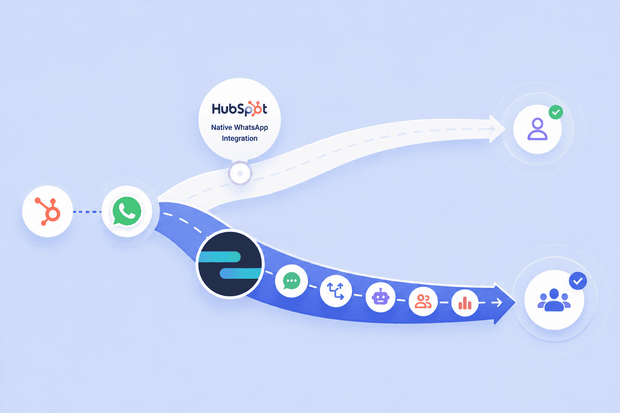
If your team needs to connect WhatsApp to HubSpot, you have two options sitting right there on the HubSpot marketplace: HubSpot's built-in WhatsApp integration and Octopods' WhatsApp HubSpot integration.
Both connect WhatsApp to your CRM, but they work in different ways, and the right choice depends on how your team operates.
The most obvious difference is scope. HubSpot's native integration is a straightforward, single-account setup that works well for teams that need to manage inbound conversations and send pre-approved template messages.
Octopods, on the other hand, lets you connect multiple WhatsApp Business Accounts to HubSpot, syncs data in both directions, and gives your team more flexibility across sales, support, and marketing workflows.
In this article, we break down the difference between HubSpot WhatsApp native integration and Octopods’ WhatsApp HubSpot integration, what each option does, where each one falls short, and which teams are better served by each.
What HubSpot's native WhatsApp integration does
HubSpot's built-in WhatsApp integration is available on Marketing Hub and Service Hub Professional and Enterprise plans. For teams already on those tiers, it's a reasonable starting point for managing WhatsApp conversations without leaving HubSpot.
The integration connects a single WhatsApp Business Account to your HubSpot conversations inbox, where your team can send and receive messages and view full message threads on individual contact records.
That shared inbox setup gives support and sales teams a centralized place to handle incoming WhatsApp conversations alongside other channels.
Here's a quick look at what the native integration includes:
| Feature | HubSpot Native WhatsApp |
|---|---|
| HubSpot inbox messaging | ✅ |
| Messages logged on contact records | ✅ |
| WhatsApp template support | ✅ (Meta-approved only) |
| Workflow automation | ✅ (templates only) |
| Multiple WhatsApp accounts | ❌ |
| Automatic contact creation | ❌ |
Limitations of HubSpot's native WhatsApp integration for growing teams
The native integration covers the basics, but several gaps become real operational problems as teams scale their WhatsApp CRM integration.
Workflow automation has many template restrictions
HubSpot's native integration supports sending WhatsApp messages through workflows, but they’re capped at 1,000 conversations per month across all connected accounts and only support contact and company personalization tokens.
On top of that, WhatsApp's 24-hour messaging window means that once a conversation goes cold, you're forced back to those approved templates to re-open it.
For sales and customer success teams that need flexible, personalized outbound sequences at scale, these restrictions limit what can be done.
No automatic contact creation from incoming messages
When an unknown number messages your WhatsApp Business Account, the native integration doesn't automatically create or match a HubSpot contact. That means manual data entry for every new inbound inquiry.
For teams handling high volumes of WhatsApp conversations, this creates a steady stream of contacts that never properly enter the pipeline.
Limited to a single WhatsApp Business Account
The native integration connects one WhatsApp Business Account to one inbox. Teams operating across multiple regions, languages, or departments — each with their own WhatsApp number — have no clean way to bring all of those accounts into HubSpot under one setup.
What Octopods adds to HubSpot's native WhatsApp integration
Octopods is an integration tool that connects WhatsApp, along with other messaging channels, directly to HubSpot.
Where the native integration covers the basics, Octopods WhatsApp HubSpot integration is built for teams that need WhatsApp to work as a fully operational channel inside their CRM.
Proactive outbound messaging from HubSpot workflows
Octopods lets you automate WhatsApp messages from HubSpot workflows. Instead of waiting for customers to reach out, your team can trigger messages automatically based on what's happening in your CRM.
That means onboarding sequences, follow-ups, and re-engagement messages that go out on time, every time, without anyone having to send them manually.
Automatic contact creation and matching
When a new number messages your WhatsApp Business Account, Octopods automatically matches it to an existing HubSpot contact or creates a new one using the phone number.
Every inbound lead lands in your CRM the moment they message you.
Multiple WhatsApp Business Accounts in one HubSpot workspace
If your business runs more than one WhatsApp number, Octopods lets you connect all of them to HubSpot at once, with each account routed to the right inbox and team.
You don’t have to jump between accounts, and you don’t lose track of conversations happening outside your CRM.
WhatsApp message templates from HubSpot
Octopods syncs your approved WhatsApp message templates directly into HubSpot, so your team can send them from a contact record or fire them automatically through a workflow without ever leaving the CRM.
HubSpot Breeze AI on WhatsApp
Once your WhatsApp is connected through Octopods, you can deploy HubSpot's Breeze AI Customer Agent to handle incoming WhatsApp messages automatically. The whole setup happens inside HubSpot, so there's nothing extra to configure on Octopods' side.
Available on Sales Hub and Service Hub Professional
Octopods works with HubSpot Sales Hub and Service Hub Professional, covering both sales and support teams without needing a separate tool for each.
HubSpot native WhatsApp integration vs Octopods: Side-by-side comparison
| Feature | HubSpot Native | Octopods |
|---|---|---|
| WhatsApp inbox in HubSpot | ✅ | ✅ |
| Messages logged on contact records | ✅ | ✅ |
| WhatsApp template support | ✅ (Meta-approved only) | ✅ |
| Workflow automation | ✅ (templates only, 1,000/month cap) | ✅ (full workflow triggers) |
| Automatic contact creation | ❌ | ✅ |
| Multiple WhatsApp Business Accounts | ❌ | ✅ |
| Two-way data sync | ❌ (one-way only) | ✅ |
| Proactive outbound messaging | ❌ | ✅ |
| Breeze AI on WhatsApp | ❌ | ✅ |
| Deals and tickets sync | ❌ | ✅ |
| Available on Starter plans | ❌ | ❌ |
| Required plan | Marketing/Service Hub Professional or Enterprise | Sales/Service Hub Professional |
How Octopods compares to other third-party WhatsApp tools
Octopods isn't the only third-party option for connecting WhatsApp to HubSpot, and the two other common approaches work differently enough to matter.
Octopods vs. TimelinesAI
TimelinesAI connects by scanning a QR code, the same way WhatsApp Web works, rather than through WhatsApp's official Business Platform. That skips Meta's business verification and template approval process, but it also means the connection runs through a method WhatsApp's own terms don't sanction for business use, worth weighing for any number you can't afford to lose.
It also logs messages as activity entries on the contact and deal timeline rather than as live conversations in HubSpot's own inbox. Octopods connects through the official WhatsApp Business Platform and delivers messages into HubSpot's native Conversations inbox as full two-way conversations.
Octopods vs. respond.io
Respond.io pulls your HubSpot contact data into its own separate workspace, so your team replies from respond.io's inbox rather than HubSpot's. Octopods works the other way; messages land directly in HubSpot's own inbox, so agents never leave HubSpot to handle a conversation.
Who should use HubSpot's native WhatsApp integration
The native HubSpot WhatsApp integration is a suitable choice for many teams.
It's worth considering if your situation looks like any of the following:
- You only need a basic inbox. If your team's main goal is to receive and reply to WhatsApp messages from inside HubSpot, the native integration does that job cleanly.
- You're already on Professional or Enterprise. There's no extra cost if you're already on Marketing Hub or Service Hub Professional or Enterprise, making it an easy decision for teams that want a simple HubSpot CRM WhatsApp setup without adding to their monthly spend.
- Your WhatsApp message volume is low. For smaller support teams handling a manageable number of inbound conversations, the priority is keeping things organized in one inbox, not automating outreach or scaling contact creation.
- You don't need proactive outreach or workflow automation. The restrictions around templates and outbound messaging only become a real problem if you're actively trying to use WhatsApp as an outbound channel. If you're not, they won't affect your day-to-day.
- You're managing a single WhatsApp Business Account. If your business runs one number for one region or department, the single-account limitation is a non-issue.
Who should use Octopods WhatsApp HubSpot integration
Octopods WhatsApp HubSpot integration is built for teams that need WhatsApp to work as a full CRM channel, not just a place to read and reply to messages.
Here's who gets the most out of it:
- Sales teams running WhatsApp follow-up sequences. If you want deal stage changes, form submissions, or contact property updates to automatically trigger a WhatsApp message, Octopods is what makes that possible inside HubSpot.
- Customer success teams running onboarding over WhatsApp. If your onboarding flow involves a sequence of WhatsApp touchpoints, Octopods lets you build and automate that entire sequence from HubSpot workflows.
- Support teams handling high inbound volumes. Octopods automatically matches incoming messages to existing HubSpot contacts or creates new ones on the spot, so every inbound lead enters your pipeline.
- Businesses managing multiple WhatsApp numbers. If your business runs separate WhatsApp accounts for different regions, languages, or departments, Octopods connects all of them to HubSpot simultaneously and routes each one to the right inbox and team.
How to choose the right WhatsApp integration for your business
Choose a third-party integration over HubSpot's native connection once you need more than one WhatsApp number, automatic contact creation, or workflow-triggered outbound messages — native WhatsApp can't do any of those.
The difference between the two options becomes clearest when you look at a real scenario.
- A sales team closes a deal and wants to automatically send a WhatsApp welcome message the moment the deal stage changes to "Closed Won."
With HubSpot's native WhatsApp integration, this isn't possible. Workflows can’t trigger WhatsApp messages beyond the restricted template limits, so someone on the team has to manually send that message every single time a deal closes, which means it either gets delayed, forgotten, or becomes someone's full-time job during a busy period.
With Octopods, a workflow fires the moment the deal closes and the customer receives a WhatsApp welcome message automatically. The team then wants to follow up seven days later if the customer hasn't completed onboarding. Another workflow handles that too.
That's the operational gap the native integration can’t close for teams that need WhatsApp to function as an active sales and success channel inside their HubSpot CRM.
So the decision really comes down to this:
- If your team needs WhatsApp as a reactive inbox — a place to receive messages, reply, and keep conversations logged on contact records — the native integration is a perfectly reasonable starting point, especially if you're already on a qualifying HubSpot plan.
- If your team needs WhatsApp to do more — automated follow-ups, onboarding sequences, multiple accounts, automatic contact creation, or full two-way CRM sync — the native integration will slow you down. Octopods is built for exactly that use case.
Ready to get started with Octopods?
Choosing the right WhatsApp CRM integration comes down to one question: does your team need WhatsApp as a simple inbox, or as an active channel that works alongside the rest of your HubSpot setup?
If it's the former, HubSpot's native integration is a reasonable place to start. If it's the latter — you need automated workflows, multiple accounts, automatic contact creation, and full two-way sync — the native integration will create more friction than it solves.
Octopods is available on the HubSpot App Marketplace, and when you install it, an account is automatically created using your existing HubSpot email.
Ready to turn WhatsApp into a channel inside HubSpot?
You can get started with the Octopods WhatsApp HubSpot integration today.
And if you have questions, you can book a call with us first.
FAQs
What is the difference between HubSpot's native WhatsApp integration and Octopods?
HubSpot's native WhatsApp integration connects a single WhatsApp Business Account to your HubSpot inbox and supports basic inbound and outbound messaging using Meta-approved templates. Octopods supports multiple WhatsApp Business Accounts, two-way CRM sync, automatic contact creation, proactive outbound messaging from workflows, and Breeze AI on WhatsApp.
Can HubSpot's native WhatsApp integration trigger automated messages from workflows?
The native integration supports sending WhatsApp messages through HubSpot workflows. Those templates are capped at 1,000 conversations per month across all connected accounts, limited to 1,024 characters, and restricted to contact and company personalization tokens.
Does Octopods replace HubSpot's native WhatsApp integration?
Yes, when you connect WhatsApp through Octopods, it serves as your WhatsApp channel inside HubSpot, so you wouldn't run both simultaneously. Octopods covers everything the native integration does and adds the capabilities that the native integration doesn't support.
Is Octopods available on HubSpot Starter plans?
Octopods is available on Sales Hub Professional and Service Hub Professional. It’s not currently listed as compatible with Starter plans, so teams on HubSpot Starter would need to be on a qualifying Professional plan to use the integration.
Octopods or TimelinesAI: which is a better fit for WhatsApp support managed in HubSpot?
Octopods, if you want to stay on WhatsApp's official Business Platform and reply from HubSpot's native inbox. TimelinesAI connects through a QR-code WhatsApp Web-style link instead of the official API. Faster to set up, but running outside what WhatsApp's terms permit for business use.
Which alternatives to TimelinesAI use the official WhatsApp Business Platform and let agents reply inside HubSpot?
Octopods and HubSpot's own native integration both connect through the official WhatsApp Business Platform and let agents reply from inside HubSpot. The native integration is limited to one WhatsApp Business Account; Octopods supports multiple accounts, automatic contact creation, and workflow-triggered messaging.
Octopods or respond.io: which fits a team that wants to keep using the HubSpot inbox?
Octopods. Respond.io pulls HubSpot data into its own workspace, so your team replies from there instead of HubSpot. Octopods delivers WhatsApp messages directly into HubSpot's own inbox, so the conversation stays where the rest of your CRM activity lives.