
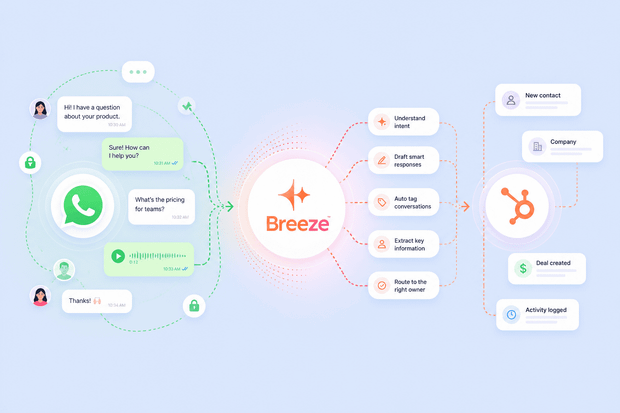
Your customers expect answers on WhatsApp at any hour, but having your team on call around the clock to handle every incoming message isn't sustainable, and it definitely doesn't scale.
Automating your WhatsApp replies is the obvious solution. If you're already using HubSpot, you don't need a separate tool to make this work.
When you connect WhatsApp to HubSpot through an integration tool like Octopods, you get access to HubSpot's Breeze AI Customer Agent directly inside your HubSpot Conversations inbox.
It helps you automate WhatsApp messages in HubSpot, answering common questions, qualifying leads, and routing conversations to the right human agent when needed.
In this guide, we show you how HubSpot Breeze AI works on WhatsApp, what you need to set it up, and what your team can expect once it's live.
What is HubSpot Breeze AI?
Breeze AI is HubSpot's native AI layer, built directly into the platform, not a third-party integration you have to manage separately.
The piece that matters most for WhatsApp automation is Breeze Customer Agent: an autonomous AI agent that handles incoming conversations on its own, without a human needing to step in for every message.
Here's what it can do:
- Answer incoming questions automatically, pulling from your HubSpot knowledge base, product documentation, and predefined conversation flows to generate accurate responses.
- Qualify leads and gather key information before routing to a sales rep, so your team picks up conversations that are already warmed up.
- Route conversations to the right team based on the nature of the inquiry — support questions go to service, sales inquiries go to the right rep.
- Hand off to a human agent when needed, with the full conversation history intact so your agent steps in with full context.
So if you're asking, Can HubSpot Breeze Customer Agent handle WhatsApp support and hand conversations to human agents?
Yes, HubSpot Breeze Customer Agent can handle WhatsApp support if you connect WhatsApp to HubSpot through an integration tool like Octopods.
How Breeze AI works on WhatsApp through Octopods
Breeze AI lives inside HubSpot. Octopods' job is to get your WhatsApp messages into HubSpot, and once they're there, Breeze helps you automate WhatsApp messages in HubSpot.
The flow works like this when there's a WhatsApp HubSpot integration:
- A customer sends a message on WhatsApp. Octopods receives it and delivers it into your HubSpot Conversations inbox as a standard conversation thread.
- HubSpot treats it like any other conversation. Breeze AI doesn't distinguish between channels — it operates at the HubSpot conversation layer, so it handles a WhatsApp message the same way it handles a live chat or email inquiry.
- Breeze Customer Agent responds automatically, using your knowledge base, product documentation, and predefined flows to reply directly to the customer through WhatsApp.
- If the conversation needs a human, Breeze escalates it and passes the full conversation history to the right agent inside HubSpot.
Octopods doesn't configure or control Breeze AI in any way. It purely acts as the bridge that makes WhatsApp visible to HubSpot.
To get your HubSpot WhatsApp automation up and running, your team needs to do two things:
- Connect WhatsApp to HubSpot through Octopods — this is what gets your WhatsApp messages flowing into HubSpot's inbox.
- Configure and deploy Breeze Customer Agent inside HubSpot — build out your knowledge base, set your conversation flows, define your escalation rules, and point Breeze to your WhatsApp channel. HubSpot's guide on deploying Breeze Customer Agent to channels walks you through this in detail.
Want to learn more about WhatsApp HubSpot integration through Octopods?
We're happy to help.
What Breeze AI can do on WhatsApp inside HubSpot
Once you automate WhatsApp replies with HubSpot Breeze AI, here's what your team actually gains.
Answer common questions automatically
Pricing queries, product information, shipping details, setup guidance. Breeze AI handles all of it instantly without a human agent needing to type a single word.
Your support team focuses on conversations that need real judgment, not ones they've answered a hundred times before.
Qualify inbound WhatsApp leads before they reach a rep
Your HubSpot AI chatbot for WhatsApp can gather the information that matters upfront, like budget, company size, and use case before routing to a sales rep.
By the time a rep picks up the conversation, the qualification is already done and they can move straight to the pitch.
Route conversations to the right team automatically
Breeze AI reads the nature of each inquiry and routes it accordingly. Support questions go to the service team. Sales inquiries go to the sales inbox.
You don’t need to do any manual triaging or sort messages according to priorities.
Hand off to human agents without losing context
When a WhatsApp conversation needs a human, your HubSpot AI customer agent escalates it cleanly, passing the full conversation history to the right agent inside HubSpot.
The agent sees everything. The customer doesn't have to repeat themselves.
Scale WhatsApp support without adding headcount
As your WhatsApp message volume grows, Breeze AI absorbs the repetitive portion automatically.
Your team handles only what needs human attention. HubSpot WhatsApp automation means the channel scales with your business without your support costs scaling at the same rate.
How to deploy Breeze AI on WhatsApp in HubSpot: Step by step
Getting your HubSpot WhatsApp automation live is straightforward. Here's what the process looks like from start to finish.
Step 1: Connect WhatsApp to HubSpot through Octopods
Install Octopods from the HubSpot marketplace and authenticate your HubSpot account via OAuth.
In your Octopods workspace settings, add WhatsApp Cloud as a channel by connecting your WhatsApp Business Account credentials.
Octopods creates a custom channel inbox inside HubSpot and links it to your WhatsApp account. From that point, incoming WhatsApp conversations flow into your HubSpot Conversations inbox automatically. Full setup details are on this WhatsApp API HubSpot connection guidelines page.
To learn more about the integration, visit our WhatsApp HubSpot integration page.
Step 2: Set up Breeze Customer Agent in HubSpot
Inside HubSpot, navigate to the Breeze Customer Agent settings and build out your agent. Connect your knowledge base content, upload product documentation, and define your conversation flows.
This is where Breeze learns what to say, how to handle different inquiry types, and when to escalate to a human. Everything you configure here applies across every channel you deploy Breeze to, including WhatsApp.
Step 3: Deploy Breeze to your WhatsApp channel
In HubSpot's channel deployment settings, select your WhatsApp inbox as one of the channels where Breeze Customer Agent should be active.
Once deployed, incoming WhatsApp messages are handled by Breeze automatically. No additional setup is required inside Octopods.
Step 4: Set your escalation rules
Define the conditions under which Breeze should hand a conversation to a human agent. For instance, specific keywords that signal urgency or frustration, conversations that remain unresolved after a set number of exchanges, high-priority or VIP contacts, or any condition your HubSpot workflow logic supports.
Getting these rules right is what makes your WhatsApp AI chatbot feel like a helpful first line of support rather than a blocker.
How support and sales teams can use Breeze AI on WhatsApp
HubSpot WhatsApp automation isn't a one-size-fits-all tool. It solves different problems depending on which team is using it. Here's what it looks like in practice for the two teams that feel the WhatsApp pressure most.
Support teams
If your support team is fielding the same WhatsApp questions day in and day out, here's where your HubSpot AI customer agent makes the biggest dent:
- Instant responses at any hour, without round-the-clock staffing.
- Fewer repetitive queries clogging up the queue.
- Consistent reply quality every time.
- Full conversation history on every escalation.
It makes all the different for how support teams manage WhatsApp in HubSpot.
Sales teams
For sales teams using WhatsApp in HubSpot as an inbound lead channel, automating WhatsApp replies with HubSpot Breeze AI solves a problem that quietly costs revenue:
- Inbound WhatsApp leads qualified before they reach a rep.
- No lead ignored because it arrived outside business hours.
- Reps spend time on qualified, context-rich conversations.
- Faster first response times keep leads from going cold.
What to expect from Breeze AI on WhatsApp
Before you deploy, it's worth being clear about what HubSpot Breeze AI on WhatsApp actually is and what it isn't.
- It's not a fully custom chatbot. Breeze AI operates within HubSpot's own Breeze framework. You configure it using your knowledge base, but you're working within HubSpot's structure, not building a custom bot from scratch.
- It's not available on all HubSpot plans. Breeze Customer Agent requires HubSpot Service Hub Professional or Enterprise. If you're on a Starter plan, you'll need to upgrade before you can deploy it.
- It doesn't replace your human agents. Breeze handles the repetitive, high-volume layer so your agents can focus on the work that actually needs a human. It's a first line of support, not a full replacement.
- Configuration happens inside HubSpot, not inside Octopods. Octopods connects WhatsApp to HubSpot and gets your messages flowing into the inbox. Everything about how Breeze responds, what it knows, and how it escalates is set up and managed entirely inside HubSpot.
Example of how Breeze AI handles WhatsApp support at scale
A customer messages your WhatsApp number at 11pm asking about their subscription plan.
- Breeze AI picks it up instantly inside HubSpot, answers the question, and handles the follow-up about upgrading.
- When the customer asks to make the actual change, Breeze recognizes it needs a human and routes the conversation to the support inbox with the full exchange attached.
- The next morning, a support agent opens the thread, sees everything that was said, and completes the upgrade in one message.
- The customer got an instant answer at 11pm.
- The agent spent two minutes on a task they had full context for. Nobody had to repeat themselves.
Getting started with Breeze AI on WhatsApp
If your team is still handling every incoming WhatsApp message manually, the fix is closer than you think.
Breeze AI is already inside your HubSpot account. What you need is a reliable way to get your WhatsApp messages in there too. That's exactly what Octopods does.
Once you set up the WhatsApp HubSpot integration, your WhatsApp conversations start flowing into HubSpot's Conversations inbox automatically, and Breeze AI takes it from there.
And if you want to go deeper on Breeze AI itself before getting started, HubSpot's Breeze AI Customer Agent page is the best place to start.
Ready to get Breeze AI live on WhatsApp?
We'll get your WhatsApp connected to HubSpot in minutes.
FAQs
Can HubSpot Breeze AI respond to WhatsApp messages automatically?
Yes, once WhatsApp is connected to HubSpot through Octopods, Breeze AI responds to incoming messages automatically using your knowledge base and predefined conversation flows, and escalates to a human agent when needed.
Does deploying Breeze AI on WhatsApp require any setup inside Octopods?
No. Octopods' job is connecting WhatsApp to HubSpot so that messages flow into your Conversations inbox. Everything related to Breeze AI, including how it responds, what it knows, and when it escalates, is configured entirely inside HubSpot.
What HubSpot plan is needed to use Breeze AI on WhatsApp?
Breeze AI Customer Agent is available on HubSpot's Service Hub Professional and Enterprise plans. If you're on a Starter plan, you'll need to upgrade before you can deploy it on WhatsApp or any other channel.
Can Breeze AI qualify WhatsApp leads before routing them to a sales rep?
Yes. Breeze AI can gather key information from incoming WhatsApp inquiries before routing the conversation to the right rep. By the time a rep picks it up, the qualification is already done.
What happens when Breeze AI can't answer a WhatsApp message?
When Breeze AI reaches the limits of what it can handle, it hands the conversation off to a human agent inside HubSpot with the full conversation history intact. The agent steps in with complete context and no repetition needed from the customer.