
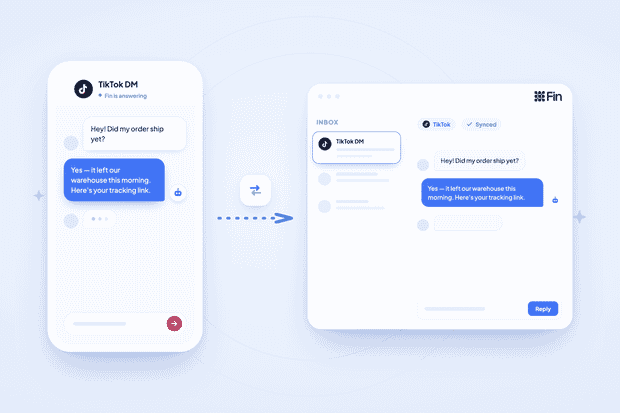
TikTok inboxes get messy fast. Comments, reactions, spam, and real questions all land in the same place, and it takes teams a long time to fish out support requests from this mess.
That’s why most teams just allocate an AI agent for TikTok DMs, and in Intercom’s case, it’s Fin.
But can Intercom Fin on TikTok actually help? Yes, Fin handles TikTok DM automation well once conversations reach Intercom. And for best results, some teams automate filtering DMs before they ever each Fin.
In this article, we show you how to connect TikTok to Intercom and build real TikTok customer support automation using Fin AI.
TikTok DMs as a support channel
Many support requests come through TikTok DMs, but managing support on TikTok is a bit different than other channels. Here's what makes it different:
- Expectation of speed: Someone watches a video, sees your product, and sends a DM expecting a fast reply, the same way they'd expect on any other messaging app.
- No history without integration: Conversations live and die inside the TikTok app itself, so there's no record for your team to reference later.
- No ownership: TikTok has no built-in way to assign conversations to agents inside your support system
- No reporting. You can't measure volume, response time, or resolution without extra tools or integrations.
- Spiky, unpredictable volume. A single video that performs well can generate more DMs in a day than your web chat sees in a month.
That volume spike is the real operational problem behind TikTok customer support automation. A support process built for slow, steady volume breaks the moment one video takes off.
To manage these unpredictable moments, you need a proper integration between TikTok and Intercom to help with reporting, ownership, and other automation features necessary for scaling.
Why Fin Intercom has no native TikTok support
Intercom Fin doesn’t have a native integration for TikTok, so Fin doesn’t support it out of the box. Along with other channels, TikTok isn't on Intercom's documented channel list for Fin.
Most TikTok DMs aren't support requests
Because TikTok is a primarily social channel, it’s not all support requests and questions. Here's what shows up in a typical TikTok DM inbox:
- Reaction emoji and hype comments
- Story reply spillover
- Comments that landed in DMs instead of the comment section
- Spam and bot messages
- Partnership and collab pitches
- Pre-sales questions
- Support questions
Unfortunately, this mix of messages has its cost. Fin charges you every time it resolves a conversation. If Fin replies to "🔥🔥" and the person never writes back, Intercom counts that as a resolution and bills you for it, even though nobody needed help.
It also wrecks your metrics. Your resolution rate is supposed to show how well Fin handles real support questions. Mix in a pile of reactions and spam, and that number stops meaning anything.
So what do you do?
You filter conversations before they reach Fin, not after
When TikTok DMs reach Intercom through an integration tool like Octopods, they arrive tagged, with a TikTok tag stamped on every inbound conversation and custom attributes already set.
That's exactly what you use to route only likely support intent to Fin, using workflow conditions on those attributes plus the message content itself.
Here are a few conditions you can test:
- Message length above a set threshold, since real questions tend to run longer than a reaction
- Presence of a question mark, since actual questions usually have one
- Keyword matches on your product or order-related terms
Everything that doesn't match gets a simple auto-reply, or nothing at all, so Fin only ever sees the messages worth its attention.
For the full breakdown of building these filters and wiring them into workflows, see how to filter TikTok messages in Intercom and how to trigger Intercom workflows from TikTok messages.
How to connect TikTok to Intercom
To connect TikTok to Intercom, you can use Octopods, an integration tool for messaging channels.
Before you start, make sure you're logged into your TikTok Business Account, since that's the account the authentication flow connects.
From there, it's 4 simple steps:
- Go to your Octopods dashboard and choose your Intercom workspace
- Select the TikTok channel
- Click "Connect TikTok Business Account" and run through the authentication flow
- Accept the permissions and continue
That's it, your TikTok account is connected. Test it by sending a message to your TikTok account and watching it sync into Intercom in real time.
For the full click-by-click walkthrough, see connecting TikTok to Intercom.
How to use Fin at the right TikTok conversations
Since TikTok connects through Octopods rather than a first-party Intercom channel, it arrives as an API conversation, and Fin only answers API conversations through a Workflow.
That's actually useful here, because it means the filter and the Fin step live in the same Workflow, in a specific order.
Here's how things work when you connect Fin to TikTok through Octopods:
- A TikTok DM arrives and creates a conversation in Intercom
- Octopods applies the TikTok tag and custom attributes to that conversation
- The Workflow evaluates those attributes and the message content against your filter conditions
- Conversations that match "likely support" branch to a Let Fin answer step
- Everything else gets a simple auto-reply, or gets closed with no reply at all
The one rule that matters more than any specific condition: Fin sits behind the filter, never in front of it.
Build your branching logic first, using the TikTok tag, message length, question marks, and keyword conditions covered above, and only route the branch that passes those conditions into the "Let Fin answer" step.
If you put Fin at the start of the Workflow and try to filter afterward, you've already paid for Fin to touch every message.
How to configure Fin for a TikTok audience
You can configure Fin for TikTok mainly through Intercom’s Guidance and audience rules.
Length
TikTok DM conversations are often short. Fin's default answers are paragraph-length, and a paragraph dropped into a TikTok thread reads like spam.
Use Guidance to set a hard character limit for your TikTok audience, tighter than what you'd use even on other chat channels.
Register
TikTok's audience are younger and more informal than your email audience, and the tone gap here is bigger than on any other channel.
Scope a Guidance rule to your TikTok audience specifically, so Fin can sound casual on TikTok without that tone bleeding into your more formal channels.
Links
Fin can't consistently present hyperlinks as clickable, formatted links, and Guidance can only encourage better formatting, not guarantee it.
Pre-sales vs. support
Some TikTok DMs are pre-purchase questions. Fin can handle that kind of lead qualification, but qualification is priced differently from a standard resolution.
If you're planning to let Fin handle both support and pre-sales questions on TikTok, you need to budget accordingly. See how Fin's pricing works.
Escalation thresholds
Another thing you need to configure is escalations. You need to configure Fin to escalate to a human agent in specific conditions. This helps you reduce the number of errors that show when AI handles conversations from start to end.
How to run Fin across multiple TikTok accounts
Here’s how it works when you run multiple TikTok accounts through one Intercom workspace.
How the connection works
Each TikTok account you connect through Octopods becomes its own channel. Every DM from every connected account lands in the same Intercom inbox, but Intercom keeps track of which account each conversation came from.
Why brands run several accounts
Most brands running multiple TikTok accounts do it for one of a few reasons:
- Regional accounts serving different markets or languages
- A dedicated support handle separate from the main brand account
- A main brand account alongside product-specific or campaign-specific accounts
What this means for Fin
Different accounts often mean different audiences, and Fin needs to treat them differently. A regional account might need Fin answering in a different language entirely, with a different tone than your global account uses.
How to scope Guidance per account
Use the source attribute Intercom captures for each conversation to scope your Guidance rules by account, the same way you'd scope Guidance by channel elsewhere.
That means you can write one set of Guidance for @brand_global and a different set for @brand_support or a regional handle, all inside the same workspace, without one account's tone or language bleeding into another's.
How to deal with access control
Restrict your agents to the accounts they actually manage. Intercom lets you limit a teammate's conversation access to specific teams.
For the full setup on connecting and routing multiple TikTok accounts, see how to manage multiple TikTok accounts in Intercom.
How to use Fin for support handover on TikTok
Escalation should run more aggressive on TikTok than on your other channels. Here's why:
- Brand risk is higher, since a bad public-adjacent interaction gets screenshotted and shared much easier than a bad email ever would
- Conversations are shorter, which means Fin has less signal to work with before deciding whether it actually understands the question
Set tighter escalation rules here, and let Fin hand off sooner rather than attempt an answer on thin context.
When your agents pick up an escalated TikTok conversation, they need to actually write for TikTok. Keep replies short and casual, matching the tone the customer is using
There's also an identity limitation. TikTok contacts arrive in Intercom without an email address or phone number attached, so Fin can't personalize account-specific answers.
One more thing to know about how these conversations behave:
- Octopods-connected conversations run as one continuous thread per customer, the same way a WhatsApp or Telegram thread does
- If an agent closes an escalated conversation and the same customer messages again, it reopens that same thread rather than starting a clean new one, unless enough time has passed for the old conversation to go stale
- That's different from a native channel, where a new conversation usually starts fresh
Make sure your agents know to check for that history rather than assuming they're starting from zero.
How to measure the success of Intercom Fin on TikTok DMs
The metric that matters most here is filter accuracy, followed by Fin’s resolution rate. Here's what to actually track:
- Filter accuracy first. Check whether most conversations reaching Fin were true support intent. This number tells you whether your filters are effective.
- Resolution rate on filtered volume only. Measure Fin’s resolution rate only against the conversations that passed your filter, since that's the only volume Fin was meant to handle.
- Escalation rate and reasons. Track how often Fin hands off, and why. A high escalation rate on filtered support conversations means your content or Guidance needs work.
- Cost per genuine resolution. This is the number that tells you whether your filtering is tuned correctly. If cost per genuine resolution is high, your filter is letting too much noise through to Fin.
Final thoughts
When you manage TikTok support using Fin, filtering matters more than automation. If you get the filtering right, Fin handles the rest well and doesn’t burn through your budget.
And if you're wondering how TikTok DMs reach Intercom at all, that's Octopods, it connects the two so your messages land in Intercom in the first place.
FAQs
Can Intercom Fin reply on TikTok?
Yes, Intercom Fin can reply to TikTok DMs once those messages reach Intercom, but TikTok isn’t a native Fin channel, so you connect it through an integration tool like Octopods. Octopods turns each TikTok DM into an Intercom conversation, a Workflow sends the right ones to Fin, and Fin’s replies go back to the customer on TikTok.
How can I use Intercom Fin to answer TikTok direct messages?
- Connect your TikTok Business Account to Intercom through Octopods, then build a Workflow that sends only genuine support questions to Fin.
- Filter out reactions and spam first with simple conditions like message length or a question mark, then add a “Let Fin answer” step on the branch that passes.