
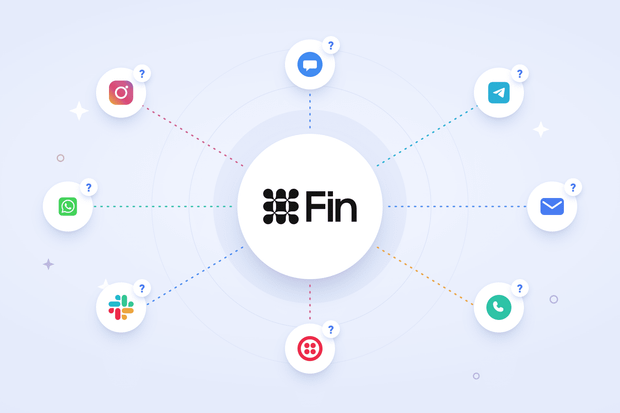
You’re considering Fin for customer support. You can imagine it handling your customer conversation from start to end, but first, you need to ask: does Fin cover the channels your customers message you on?
The answer is yes, Fin works on some messaging channels, as verified by Intercom's documentation on October, 2026.
That said, the Intercom Fin AI Agent channel list shows up slightly differently across documentation pages. That's why, in this article, we pull from all three sources and give you an accurate answer.
Messaging channels Fin supports natively
Fin's confirmed channel list covers these channels:
- Intercom Messenger
- SMS
- Facebook Messenger
- Telegram
Intercom Messenger (web, iOS, Android). This is where Fin has its full feature set. You get the interactive preview, source citations in replies, quick-reply buttons, and multi-brand styling.
Email. Fin replies from your own domain in your own brand voice, and it filters out spam and phishing before Fin ever responds to it. Not only that, but it also formats its email answers with full sentences and clear structure instead of reusing the short, snappy replies you'd see in Messenger.
WhatsApp. Fin handles WhatsApp support directly, so if your customers are used to messaging you there, Intercom Fin WhatsApp support is one of the six channels you can rely on out of the box. Just keep the 24-hour reply window in mind, since messages sent outside it need a pre-approved template.
SMS. Fin replies stay short and text-friendly here, with no source links and no reply buttons cluttering up the message. However, replies are capped at 1600 characters, and images or rich media don't go out over SMS, so keep that in mind if your support content leans on visuals.
Facebook Messenger. Here, Fin handles Facebook Messenger with a more neutral, support-focused tone and fuller responses than you'd get on Instagram or SMS.
Instagram. Instagram support through Fin works best with shorter, more casual replies, matching how people actually use the platform.
Telegram. Intercom added a native Telegram channel. It’s bot-only, so you connect a Telegram bot created through @BotFather, and Fin can answer those conversations. If you also need to connect personal Telegram accounts, you’ll need an integration like Octopods.
More channels Fin works on
Phone, through Fin Voice. Fin Voice connects to Intercom Phone as well as to a range of third-party telephony providers, and it's built to replace long hold times. Availability is currently limited to select customers, so check your own account's current status before planning around it.
Discord. When a customer messages in a connected Discord server, that message turns into an Intercom conversation, and Fin can respond from there.
Slack. Slack support through Fin is built for communities and Connect channels, and it can reply in threads using the professional tone you need.
Fin Agent API. This lets you embed Fin into a custom-built app, chatbot, or self-serve portal while keeping your own interface front and center. One constraint worth flagging: Fin can only respond to API-created conversations when triggered from inside a Workflow, so it doesn't work as a fully hands-off channel on its own.
Two more details worth knowing as you plan your setup:
- Fin Vision, which lets Fin read images and screenshots customers send, is documented specifically for chat and email. Image handling isn't uniform across every channel Fin touches, so don't assume it works the same way on SMS or social.
- Multi-brand configuration, where Fin references different Help Centers and Messenger styles per brand, is also documented specifically for chat and email rather than across the full channel list.
Messaging apps Fin does not support natively
Fin doesn’t support these widely used messaging apps: Viber, TikTok, LINE, and WeChat.
However, "not supported natively" doesn’t mean it’s not possible.
Fin can work on those channels, but only through Fin integrations.
For example, Intercom has no first-party Viber channel to connect in the first place, so there's nothing for Fin to attach to. The same logic applies to TikTok, LINE, and WeChat. Fin AI agent channels are limited by which channels Intercom has built a native connection for, not by anything Fin can or can't do once a channel exists.
How third-party integrations benefit Fin's channel coverage
While Fin works with channels connected via third-party integrations like Octopods, Intercom's Support team may have limited ability to troubleshoot issues specific to the third-party integration itself (source).
Here's what it looks like in practice. A tool like Octopods connects the unsupported channel to Intercom and turns each inbound message into a standard Intercom conversation.
Because it's now a normal Intercom conversation, Fin can be pointed at it, generally through a Workflow, the same way it's pointed at any other channel.
Fin then answers using the same content sources, guidance, and escalation rules you've already set up everywhere else, and the reply routes back out through the original channel to reach the customer.
That said, this setup comes with limitations:
- Intercom Support won't debug the integration layer itself. If something breaks in the connection, that's on the vendor providing the integration, not Intercom.
- Channel-native features often don't survive the round trip. Viber rich media, and similar platform-specific elements generally get lost along the way.
- Fin's channel-specific optimizations were built for its native channels. On a routed channel, you're working with Fin's general behavior, so you'll need to fine-tune it through Guidance to get the results you want.
- Reporting may need extra configuration to keep routed-channel conversations cleanly separated from Fin's native channel data.
Full channel comparison
| Channel | Native | Via integration | What to know |
|---|---|---|---|
| Intercom Messenger | Yes | Already native | Most fully featured surface |
| Yes | Already native | Spam/phishing filtering, longer auto-close window | |
| Yes | Yes | Both paths work. | |
| SMS | Yes | Yes | Native, or via Twilio through an integration |
| Facebook Messenger | Yes | Yes | |
| Yes | Yes | Native covers DMs; check comment handling | |
| Phone / voice | Yes | — | Fin Voice; limited availability, verify |
| Slack | Documented on fin.ai | Yes | Community and Connect channels |
| Discord | Yes | — | Server messages create Intercom conversations |
| Telegram | Yes | Yes | Native integration is bot-only |
| Viber | No | Yes | |
| TikTok DMs | No | Yes | |
| LINE | No | Yes | |
| No | Yes | ||
| Custom / in-product | Fin Agent API | Already native | Workflow required for API conversations |
What changes for your agents on non-native Fin channels
Once a channel is routed through an integration, day-to-day support mostly looks the same as it does everywhere else, but a few things work differently.
Here's what actually changes across the inbox, handover, reporting, and troubleshooting.
Inbox experience
Routed conversations, whether from a Telegram integration or a Twilio SMS connection, show up in the Intercom inbox as standard conversations, same as any native channel. The one difference is identity:
- Channels like Telegram don't hand over an email address, so the contact record shows whatever identifier the channel provides instead, such as a username or phone number.
- This is expected behavior, not a broken profile, so agents don't need to chase down a missing email.
Handover
Escalation to a human agent works the same way it does on every other channel, with no extra steps for your team. What does matter:
- Agents should know which channel they're replying into, since tone and length expectations shift by platform.
- A reply that reads fine on email can feel far too long on Telegram or Viber, where people expect short, quick messages.
Reporting
You can still segment routed conversations by channel the same way you already segment your native channels. However, it affects reporting. That's why you need to make sure an integration channel isn't mixed in with a native channel in your reports.
The troubleshooting split
When something breaks, the fastest way to find the source is to ask one question: is Fin answering at all?
- Fin answers, but gets it wrong. There might be a content or guidance problem. To fix this, you need to check what Fin is pulling from and adjust your Guidance rules.
- Fin doesn't answer at all. The issue is more likely upstream. Intercom's own troubleshooting guidance points to four things to check first:
- Fin is enabled for that channel
- Audience targeting isn't excluding the conversation
- The customer's language matches your content
- Real-time translation is turned on, if needed
- None of those four explain the silence? The conversation likely isn't reaching Intercom at all, which points to the integration layer rather than Fin itself.
What Intercom supports & what it doesn’t
Intercom supports Fin itself and supports Fin on its native channels. For anything routed through a third-party integration, Intercom's Support team may have limited ability to troubleshoot issues specific to the third-party integration itself.
If you route a channel through a third party, that vendor owns that layer, not Intercom.
Before committing to any integration vendor, it's worth asking a few direct questions: what their response times look like, whether they maintain a public status page, and whether they'll join a call with Intercom's team if an issue spans both systems.
Which channel should you deploy Fin on first?
You can deploy Fin first on whichever channel your customers use most to reach out for support, which for most teams means Messenger or email.
Intercom's own guidance is direct on this point: starting with your highest-traffic channel gets you better results fast. On top of that, it gives you better data to optimize with, since you're working with the biggest sample size from day one.
Intercom also advises against rolling Fin out everywhere at once, framing full channel coverage as something to build toward over time rather than launch all at once.
A few practical additions worth factoring in as you plan your own rollout:
- Match volume with content strength. Start where your support volume is highest and your documentation is most solid, since Fin's answers are only as good as the content it's pulling from.
- Give async channels more breathing room. Intercom points to 1–2 days as a common auto-close window for email, compared to just a few minutes on live chat channels.
- Save routed channels for round two. If you're planning multi-channel support across multiple inboxes, deploy Fin on a routed channel second or third, not first. Getting a native-channel baseline in place first gives you something solid to compare against before you introduce an integration as a second variable. For a broader look at how these connections work, see this guide to Intercom messaging integrations.
Conclusion
Fin's native channel list is shorter than most teams assume, covering a solid core of Messenger, email, WhatsApp, SMS, Facebook Messenger, Telegram, and Instagram, with phone, Slack, and Discord documented alongside them.
Missing channels aren't impossible to connect, but they need an integration layer because they aren't natively supported by Intercom.
For teams that need Telegram Personal, Viber, or TikTok specifically, Octopods covers those channels by routing them into Intercom as standard conversations Fin can work with.
FAQs
Does Intercom Fin work on Telegram?
Yes, Intercom recently introduced a Telegram bots native integration, and other third-party integrations like Octopods introduce both bot and personal account integrations.
Does Fin work on WhatsApp?
Yes, WhatsApp is one of Fin's natively supported channels. It works on both Intercom’s native integrations and third-party WhatsApp integrations.
Can Fin handle phone calls?
Yes, through Fin Voice, which connects to Intercom Phone and to third-party telephony providers. Availability is currently limited to select customers working with Intercom's sales team, so it's worth confirming current access before planning around it.
What languages does Fin support?
Fin is documented to work in 45 languages. Outside that list, its behavior in AI-generated answers becomes unpredictable regardless of what language your support content is written in, and real-time translation needs to be turned on for Fin to answer in a language your content isn't written in.
Can Fin work without Intercom?
Yes, through Fin for platforms. Freshdesk and Freshchat access is self-serve, while Salesforce and HubSpot access go through Intercom's sales team rather than self-serve sign-up. There's also a separate, dedicated Fin for Zendesk integration.
Does Fin support all channels equally well?
No. Fin's behavior is optimized per channel, and details like Fin Vision's image and screenshot handling are documented specifically for chat and email rather than across every channel.
Can I use Intercom Fin to answer customer messages on LINE?
Yes. Octopods connects LINE to Intercom through Intercom's Custom Channel integration, which treats LINE like any other Intercom channel, including making it available to Fin. Fin can resolve LINE conversations directly and hand off to a human agent with full context when it can't.
Which integration lets Intercom Fin answer customers across Telegram, LINE, Viber, and TikTok?
Octopods. It connects each of these channels to Intercom through Intercom’s Custom Channel integration, so every message arrives as a standard Intercom conversation that Fin can answer and hand off to a human agent when it can’t resolve it. Fin’s channel-specific behavior was built for Intercom’s native channels, so expect to fine-tune answer length and tone with Guidance on each one.