
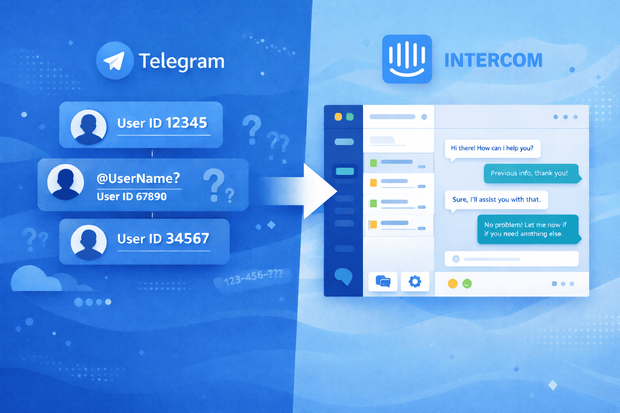
Telegram doesn't identify users like WhatsApp and SMS. It's different, and that causes confusion for both businesses and customers. The issue especially shows up when you try to integrate Telegram with Intercom.
Unlike WhatsApp or SMS, Telegram doesn’t guarantee a phone number. Some users share one, others don’t. Many users interact using usernames only, and some stay completely anonymous.
For support teams used to identifying customers by phone number or email, this raises an immediate question: How does Intercom know who’s who on Telegram?
That’s what we’re clarifying in this article. Below, we explain:
- How Telegram user identity works in Intercom
- How users are identified and mapped
- How that identity is preserved across conversations.
How Telegram identifies users
Every Telegram user is assigned a unique, immutable Telegram user ID. This ID is permanent and doesn’t change, even if the user updates their profile or switches devices.
From Telegram’s perspective, this user ID is the only reliable way to identify a person.
Other profile details are far less dependable because of the following reasons:
- Telegram usernames are optional. A user may not have one at all, and if they do, they can change it anytime.
- Phone numbers aren’t reliable. Users can hide them completely or choose not to share them with bots and businesses.
- Display names aren't unique. Multiple users can have the same name, and names can be edited freely.
Because of this, Telegram does not treat usernames, phone numbers, or display names as stable identifiers.
The Telegram user ID is the only reliable identifier.
How Telegram users are synced to Intercom contacts
When you integrate Telegram and Intercom, Telegram messages arrive in Intercom inbox. But how are Telegram users mapped to Intercom contacts?
1. Telegram user ID is the identity anchor
Every incoming Telegram message includes the sender’s unique Telegram user ID. All integration tools for Intercom and Telegram, like Octopods, uses this ID as the single source of truth for identifying the user. This ensures that each Telegram user maps to one Intercom contact.
2. Creating or updating the Intercom contact
When a customer contacts your business for the first time, the integration layer you’re using between Intercom and Telegram creates a new Intercom contact and associates it with that Telegram user ID.
On repeat contact, it recognizes the same Telegram user ID and routes the message to the existing Intercom contact instead of creating a duplicate.
3. What information is stored on the contact
Alongside the Telegram user ID, integration tools like Octopods attach available Telegram context to the Intercom contact, including:
- Telegram user ID (always present, always reliable)
- Telegram username (if the user has one)
- Telegram display name
- Conversation history, visible directly inside Intercom conversations
4. What this means in practice
From a support agent’s perspective, this feels smooth. Messages from the same Telegram user always appear under the same Intercom contact.
Full conversation history remains intact even if the user updates their username or hides their phone number.
What happens when Telegram users don’t share a phone number
This is usually the first concern support teams have when evaluating a Telegram Intercom integration, and the short answer is: nothing breaks.
Intercom doesn’t require a phone number to create or maintain a contact. Phone numbers are just one possible attribute, not the main one.
When a Telegram user doesn’t share a phone number, their conversations still work normally inside Intercom:
- Messages appear in the Intercom inbox
- Conversations can be assigned to teammates
- Conversations can be tagged and categorized
- Messages can trigger automations, workflows, and routing rules
What makes this possible is the Telegram user ID.
Examples of Telegram user identity in Intercom
To make this more concrete, here’s how Telegram user identity works in Intercom across common real-world scenarios.
1. Anonymous user (no username, no phone number)
A user messages your Telegram channel without a username and without sharing a phone number.
- An Intercom contact is still created
- The contact is anchored to the Telegram user ID
- All future messages from that user appear under the same contact
- Conversation history is preserved inside Intercom
2. Username-only user
A user has a Telegram username but doesn’t share a phone number.
- The username is shown on the Intercom contact
- The Telegram user ID remains the primary identifier
- If the user changes their username, the contact stays the same and the displayed username can be updated
3. User switches devices
A user messages your team from a new phone or desktop app.
- Telegram keeps the same user ID across devices
- Intercom recognizes the user as the same contact
- Previous conversations and context remain visible to the support team
Device changes don’t affect identity or history.
4. Business or public Telegram account
A partner or public-facing account contacts your team using a recognizable Telegram username.
- The username is visible in Intercom
- Identity is still backed by the Telegram user ID
- Useful for managing conversations with external partners or business accounts
Even in these cases, identity stability doesn't rely on the username alone.
How conversation history is preserved over time
One of the biggest worries teams have when adding Telegram to Intercom is whether conversation history can be lost. In fact, it doesn’t get lost.
Intercom doesn’t rely on usernames, phone numbers, or devices to link conversations. As long as messages come from the same Telegram user ID, Intercom treats them as the same contact.
Here’s how common scenarios play out:
- If a user changes their Telegram username
The contact remains the same. Only the displayed username may update. Past conversations stay visible because the Telegram user ID hasn’t changed.
- If a user deletes and re-installs Telegram
If the user logs back in to the same Telegram account, Telegram keeps the same user ID. Intercom recognizes the user and continues the conversation history normally.
- If a user permanently deletes their Telegram account and creates a new one
Telegram assigns a new user ID. Intercom treats this as a new contact, and a new conversation history begins. Previous conversations remain archived under the old contact.
How user identity affects routing, automation & reporting
Once Telegram user identity is mapped correctly in Intercom, all support workflows, like routing, automation, and reporting, work normally.
Automation in Intercom doesn’t depend on phone numbers. Instead, it runs on stable identifiers and conversation context, including:
- The Telegram user ID behind the contact
- Conversation attributes and metadata
- Tags applied by agents or automation rules
This means workflows like auto-assignment, SLA handling, escalation rules, and follow-ups behave the same way they do for email or chat conversations.
Common myths about Telegram identity in Intercom
There’s a lot of confusion around Telegram user identity in Intercom, mostly because Telegram works differently from SMS or WhatsApp.
Here are the most common misconceptions:
- Telegram users must share a phone number
- Not true. Intercom doesn't require a phone number to create or manage a contact.
- Usernames are required to identify users
- No, usernames are optional on Telegram and can change at any time. The Telegram user ID is what ensures consistent identification.
- Conversations can’t be linked over time
- They can and they are. As long as the Telegram user ID remains the same, Intercom links new messages to the existing contact.
- Telegram users are anonymous forever
- While users may start without a username or phone number, they are still consistently identifiable via their Telegram user ID. This means support teams can recognize returning users even if personal details are limited.
Want to know how to handle Telegram identity in Intercom?
When Telegram identity limitations matter
Telegram identity works reliably in Intercom for most use cases, but it’s important to know the boundaries.
Telegram is ideal for:
- Support teams managing ongoing conversations
- Operations that need a single, unified contact view
- Real-time help where speed and context matter more than personal details
Telegram is less ideal if:
- Your workflows require phone numbers for verification or external systems
- You rely on SMS-style identity where every contact must be linked to a phone number
For most support and operational scenarios, Telegram user identity in Intercom is reliable. Limitations only matter if your process depends on phone-number-based identity. Knowing this helps teams make an informed choice without overestimating the risks.
Frequently Asked Questions
How does Intercom identify Telegram users?
Intercom identifies Telegram users primarily using the Telegram user ID, a unique and immutable identifier assigned by Telegram. Unlike phone numbers or usernames, which can be hidden or changed, the Telegram user ID is stable and guarantees that each user maps to a single Intercom contact.
Can Intercom create contacts without phone numbers?
Yes. Intercom doesn’t require a phone number to create or manage contacts, making it fully compatible with Telegram users who prefer anonymity. Even if a Telegram user does not share a phone number, their messages will appear in Intercom, can be assigned to agents, tagged, and used in automation workflows.
What happens if a Telegram username changes?
If a Telegram user changes their username, Intercom still recognizes the contact because the identity is based on the Telegram user ID, not the username.
Are Telegram conversations linked to CRM records?
Yes. When integrated through a solution like Octopods, Telegram conversations are mapped to Intercom contacts, which can sync with CRM systems as needed. Each conversation is linked to a contact via the Telegram user ID, preserving history and context.
Can I merge Telegram users with other Intercom contacts?
Yes, Intercom allows merging contacts, including those created from Telegram messages. However, the Telegram user ID remains the anchor for identity, so merging must be done carefully to avoid losing conversation history.