
Telegram is a critical communication channel for many support teams. Customers use it to ask questions and report issue, so naturally, teams connect it to their support tools, like Intercom.
But how do Telegram bots work with Intercom?
Telegram doesn’t work like WhatsApp, email, or live chat. It’s 100% bot-based, which means businesses can’t receive or send messages on Telegram without a Telegram bot.
Because it operates differently, many teams struggle to understand what Intercom can and can’t do with Telegram bots.
In this article, we’ll explain:
- What Telegram bots are and how they actually work
- Why bots are the only way to connect Telegram to Intercom
- Common limitations teams run into when using Telegram bots
- Practical Telegram bot workflows inside Intercom
How Telegram bots work with Intercom
To understand how Telegram bots work with Intercom, it helps to start with how Telegram itself works.
A Telegram bot is an automated account on Telegram that businesses use to send and receive messages with users without relying on a phone number or a human-operated Telegram account.
That means:
- Businesses communicate through a Telegram bot, not a personal or business phone number
- Every message a customer sends goes to a bot
- There is no way to connect Telegram to Intercom without using a bot
To connect a Telegram bot to Intercom, you need:
- A Telegram bot, created using Telegram’s Bot API
- A bot token, which acts as the authentication key for that bot
That said, Telegram bots don’t connect to Intercom natively. You need an integration layer like Octopods to connect the two platforms.
The setup looks like this:
- A user sends a message to a Telegram bot
- The bot receives the message using its bot token
- The integration provider forwards the message to Intercom
- Intercom displays it as a standard inbox conversation
From an agent’s perspective, Telegram conversations inside Intercom behave like any other channel.
A common misconception here is that one bot equals one conversation, but it's not true.
In reality:
- One Telegram bot can receive messages from unlimited users
- Each user who messages the bot becomes a separate conversation
- The bot acts as a shared entry point, not a single chat thread
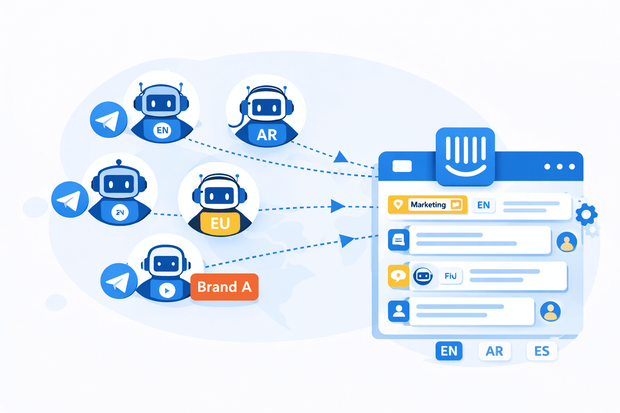
Since one bot can serve many users, you might wonder why companies create more than one bot.
Common reasons include:
- Different brands using Telegram under the same company
- Regional teams that need separate workflows or languages
- Language-specific bots to simplify routing and automation
- Separation between support, sales, or operations
Each bot can be connected to Intercom and routed differently, while still appearing as normal conversations in the inbox.
Want to see how a Telegram Intercom integration works through Octopods?
Using Intercom bots (Fin + Custom Bots) on Telegram
Can Intercom’s own bots (Fin or custom-built bots in Intercom’s bot builder) automatically reply to Telegram conversations once connected?
Yes. When you connect a Telegram bot to Intercom through an integration layer like Octopods, incoming Telegram messages appear in your Intercom inbox just like any other channel.
That means Intercom’s automation including its bot builder and rules sees those messages and can act on them.
When a user sends a message to your Telegram bot, Intercom’s bots:
- Detect keywords or intent in the message
- Send automated replies
- Trigger workflows, tags, assignments, notifications, etc.
This means your team can keep using familiar Intercom automation tools while serving customers on Telegram.
What Intercom bot features don’t work on Telegram
Not everything in Intercom translates perfectly to an external messaging platform like Telegram:
- Intercom’s product tours don’t work on Telegram. These are interactive UI experiences designed for web or in-app engagement, they won’t render inside the Telegram chat interface.
- Features that depend on web-based UI elements (like modals, embedded forms, or guided tooltips) won’t work within Telegram because the platform doesn’t support those kinds of UI interactions.
- Interactive elements like carousels or complex layouts often won’t appear as intended.
Why Octopods matters here
An integration platform like Octopods is what makes all of this possible. Without it, you can’t natively connect a Telegram bot to Intercom. Telegram doesn’t provide a direct bridge on its own. Octopods:
- Connects your Telegram bot to your Intercom workspace.
- Ensures messages show up in Intercom as real conversations.
- Lets Intercom bots and workflows act as if Telegram were a standard channel.
- Handles replies back to the Telegram user seamlessly.
This integration layer gives you the best of both worlds: the advanced automation and AI capabilities of Intercom plus the reach and accessibility of Telegram.
What you can do with a Telegram bot in Intercom
Here’s an overview of how a Telegram bot works in Intercom:
- You can receive all messages sent to your Telegram bot in the Intercom inbox, where each user conversation is tracked separately.
- Replies can include text, emojis, media files, documents, and stickers
- Intercom’s standard tools like assignment and automation rules apply to Telegram messages just like any other conversation.
- You can trigger workflows based on keywords or events and use Fin or custom Intercom bots to handle FAQs
- Conversations can also integrate with CRM workflows to capture leads, log tickets, or track deals automatically.
Telegram Bot flows you can build in Intercom
Below are high-value Telegram bot flows for support, sales, and operations that teams commonly build in Intercom.
First-response bot flow
A first-response bot flow instantly replies to incoming Telegram messages and asks users what they need help with. It also collects basic issue details before an agent joins. It’s often the first type of bot teams set up.
Why it matters:
- Improves first response time for teams
- Sets clear expectations for response and resolution
- Reduces back-and-forth once the conversation reaches an agent
After-hours Telegram support bot
Telegram users expect fast replies, even outside business hours.
Telegram bots that handle after-hour inquiries:
- Acknowledge the user’s message immediately
- Explain support availability and response timelines
- Offer self-help resources or FAQs
This improves customer experience as they get replies even when live support isn’t available.
Issue triage bot
An issue triage bot helps route conversations before an agent reads them.
The bot first asks users to choose a category or reply with a keyword like billing, technical issue, account access, etc. Then, Intercom bot uses the response to tag and route the conversation
This result in:
- Faster routing to the right team or queue
- Less manual reassignment
- Cleaner inbox organization for Telegram conversations
Multi-language Telegram bot flow
Telegram has strong adoption in multilingual regions like MENA, LATAM, and CIS, making language detection especially important.
What this flow does:
- Asks users to select a preferred language
- Routes the conversation to language-specific teams
- Sends bot replies in the selected language
Lead qualification bot
In some industries, Telegram is a primary inbound lead channel, so teams need to qualify leads on it.
A lead qualification bot can:
- Ask qualifying questions (company size, use case, urgency)
- Capture contact or account details
- Route qualified leads directly to sales teams in Intercom
It helps sales teams focus on high-intent leads without manually screening Telegram messages.
Information collection bot
An information collection bot’s main purpose is to collect basic information from customers, including account IDs, emails, and so on. It’s a practical solution that saves agents time and helps customers get their issues fixed faster.
Why teams love this:
- Agents start with context
- Issues get resolved faster
- Fewer repetitive clarification questions
Telegram notification and reminder flows
Telegram supports outbound messages without WhatsApp’s 24-hour reply restriction, making it ideal for proactive communication.
A bot responsible for Telegram notifications and reminder flows can take care of:
- Booking or appointment reminders
- Shipping and delivery updates
- Payment follow-ups
- Document or identity verification prompts
Advanced Telegram bot use cases
Businesses typically create multiple Telegram bots for reasons like:
- Multi-brand support, where each brand has its own Telegram presence
- Multi-region operations, with different bots for different markets
- Language separation, especially in regions like MENA, LATAM, and CIS
- Different use cases, such as support, sales, and operations using Telegram independently
Limitations of Telegram bots in Intercom
Telegram bots work well with Intercom when set up correctly. However, some Telegram Intercom integration issues might arise.
Many teams run into issues simply because Telegram and Intercom follow different platform rules, and those rules can’t be overridden by integrations.
Telegram limitations
Some limitations come directly from how Telegram is designed.
Bot-only messaging
- Businesses can only communicate through Telegram bots
- You can't message users from a personal Telegram account
- Every interaction must go through a bot the user has already contacted
User identity constraints
- Telegram usernames are optional
- Phone numbers are hidden by default
- Many users appear as anonymous profiles with limited identifiers
This means Intercom often has less identity data compared to channels like email or WhatsApp.
Intercom limitations
Other constraints come from Intercom itself.
No bot creation inside Intercom
- Intercom doesn't create or manage Telegram bots
- Bots must be created in Telegram first
- Intercom only receives messages once a bot is connected via an integration layer
Limited delivery visibility
- Intercom doesn't provide advanced delivery or read logs for Telegram
- Message delivery status depends on Telegram and the integration layer
- Failures caused by blocked bots or user settings may not be fully visible
Operational limits
These are practical constraints that affect day-to-day operations.
Conversations depend on bot reach
- Users must first interact with the bot
- If a user blocks the bot, messages can't be delivered
- Bots can't proactively reach new users without prior interaction
Telegram privacy rules can't be overridden
- Bots can't force users to share usernames or phone numbers
- Identity data is limited by Telegram’s privacy model
Why this matters
Most cases of a “Telegram bot not working in Intercom” aren’t bugs, they’re platform boundaries. An integration layer like Octopods can:
- Reliably deliver messages into Intercom
- Preserve conversation context
- Enable automation and routing
But it can't change Telegram’s privacy model or Intercom’s channel constraints.
Why your Telegram bot isn’t working with Intercom
If your Telegram bot isn’t delivering messages to Intercom or automation isn’t working, the cause is usually related to setup or platform rules.
Common issues include:
- Invalid bot token: The token from BotFather must be correct. If it’s wrong, Intercom can't receive messages.
- Webhook conflicts: If another service is using the same bot, messages may be blocked from reaching Intercom.
- Privacy mode blocking messages: When privacy mode is on, the bot only sees messages that start with a command, which can stop workflows from triggering properly.
- Bot created incorrectly in BotFather: Missing settings, permissions, or webhook configuration can prevent the bot from working.
Conclusion
Telegram bots can feel tricky at first, but once you understand how they work with Intercom, they’re a powerful way to manage conversations, automate replies, and keep your teams organized.
Remember, one bot can handle many users, and with the right setup, or an integration layer like Octopods, you can scale across languages, regions, and brands without losing control.
FAQs
Can Intercom connect multiple Telegram bots?
Intercom can't natively connect multiple Telegram bots on its own. Telegram’s platform is fully bot-based, and Intercom’s native setup typically supports just one bot per connection. You need an integration layer to connect all your bots to Intercom.
How to handle multiple Telegram bots in Intercom?
To handle multiple Telegram bots in Intercom, you can:
- Create separate bots in Telegram using BotFather for each brand, region, or language.
- Connect them through an integration layer like Octopods
- Set up routing rules in Intercom based on the bot
- Maintain automation and workflows for each bot
- Monitor performance per bot