
TikTok drives real customer conversations. Someone sees your product, sends a DM, and expects a fast response.
The problem is, if those messages never connect to your support or sales workflows, you end up handling them manually.
- No automatic routing to the right team
- No SLA tracking
- No follow-up sequences
- No structured way to move a conversation from "new message" to "resolved."
Every TikTok DM becomes a one-off interaction that lives and dies in isolation.
The fix is bridging TikTok into your existing support stack, in other words, connect it to Intercom. Then, you'll be able to trigger workflows in Intercom from TikTok messages.
This guide walks you through exactly how to set that up.
How Octopods brings TikTok messages inside Intercom
Intercom doesn't have a native integration for TikTok. The only integration available is through third-party integration tools.
Octopods is an integration tool that connects TikTok to Intercom .
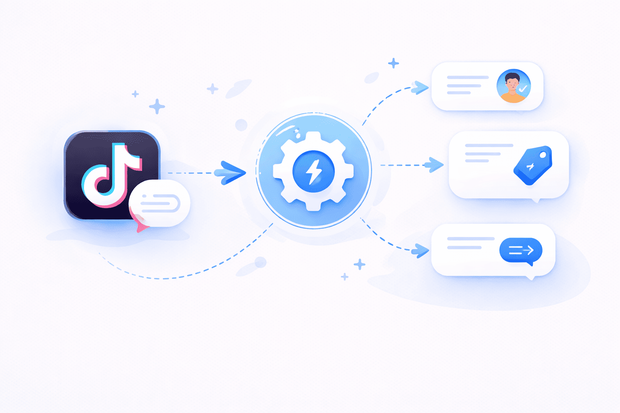
After you connect both tools, here's what happens the moment a customer sends your business a TikTok DM:
- Octopods catches it — it listens to your TikTok account in real time and picks up every incoming message automatically.
- A structured conversation is created in Intercom — including the customer's TikTok details, the message content, and a timestamp.
- The channel is identified as TikTok — so Intercom knows exactly where the conversation came from.
- Tags and custom attributes are applied — for example, a "TikTok" tag gets stamped on every inbound conversation, giving your workflows something concrete to act on.
The result is that TikTok messages stop being isolated DMs and start behaving like any other inbound channel in Intercom.
Once they're inside, your existing workflows can route them, respond to them, track them against SLAs, and move them through whatever lifecycle you've already built.
You don't need to rebuild anything. You just need TikTok conversations to show up in the right place.
See how Octopods connects TikTok to Intercom
How to automate TikTok workflows in Intercom
Once TikTok conversations are flowing into Intercom via Octopods, you don't need to build anything new from scratch.
You just need to make sure your existing workflows are configured to recognize TikTok as a channel and the rest happens automatically.
- Start with the right trigger
For TikTok, you want a trigger that fires the moment a new inbound message arrives. That way, the workflow catches the conversation at the very start, before any manual handling happens.
- Scope it to TikTok
Intercom lets you specify which channels a workflow applies to. Scoping yours to TikTok keeps your routing logic clean.
TikTok conversations follow their own path, and your other channels aren't affected.
- Add conditions
Conditions let you get more specific about when the workflow should run. You can filter by:
- Whether it's a new conversation — so the workflow fires once at the start, not on every follow-up message.
- Tags — if Octopods is stamping a "TikTok" tag on every inbound conversation, you can use that tag as a condition to branch your logic further.
- Keywords — route conversations based on what the customer actually said, before a teammate ever reads it.
- Let the automations run
Once your trigger and conditions are in place, the workflow does the rest, assigning to the right team, sending an auto-reply, applying SLAs, whatever you've configured.
Common TikTok workflow triggers examples
Here are some real-life workflow trigger examples you can use for your TikTok Intercom integration.
Auto-tag TikTok conversations
If your team handles multiple channels, knowing where a conversation came from matters for routing, reporting, and keeping your inbox organized.
When you apply a "TikTok" tag to every inbound conversation automatically, you give your workflows a reliable condition to filter on, without anyone having to do it manually.
Trigger sales qualification workflows
For sales teams, speed matters. A lead who DMs you on TikTok asking about pricing is already warm, but if they sit in an unmonitored inbox, that moment passes.
A workflow that watches for buying-intent keywords and instantly routes the conversation to the right rep means high-intent leads get picked up before they go cold.
Start follow-up reminders
Even with the best intentions, conversations get buried. For teams managing high message volumes, a TikTok DM can easily go quiet after the first reply, especially if it came in during a busy period.
A follow-up reminder workflow nudges the assigned teammate automatically, so no lead or support request gets forgotten just because it came from a less familiar channel.
Launch after-hours responses
Customers on TikTok don't keep business hours. When a DM arrives at midnight, leaving it completely silent until morning creates a poor first impression.
An after-hours workflow sends an instant acknowledgment, setting expectations, confirming you received the message, and giving your team a clean handoff when they're back online.
Apply SLA timers for TikTok DMs
Support teams with response time commitments need TikTok to play by the same rules as every other channel.
Attaching an SLA timer the moment a new TikTok conversation is created ensures nothing slips through unnoticed. And if a conversation isn't picked up in time, it escalates automatically.
Best practices for TikTok-based automation
Getting the setup right is only half the job. Here's what to keep in mind as you build and improve your TikTok workflows:
- Don't over-automate every DM. Automation works best when it handles predictable, repeatable actions. Not every TikTok message fits a clean pattern, so leave room for human judgment where it matters most.
- Separate marketing campaigns from support triggers. If TikTok campaigns are driving inbound DMs, those conversations need different handling than organic support requests.
- Combine channel and tag conditions. Scoping a workflow to TikTok is a good start, but pairing it with tag conditions gives you better control. A "TikTok + sales" workflow should behave very differently from a "TikTok + support" one.
- Monitor workflow performance regularly. As your TikTok message volume grows, check that workflows are firing as expected and conversations are reaching the right teams.
Want to set up automations for your TikTok Intercom integration?
FAQs
Can TikTok messages trigger Intercom workflows?
Yes, when you connect TikTok to Intercom through Octopods, every incoming TikTok DM is converted into a structured Intercom conversation. From that point, your existing Intercom workflows treat it like any other inbound message, firing automatically based on the triggers and conditions you've set up.
Can I automate follow-ups for TikTok leads?
Yes, once a TikTok DM lands in Intercom, you can set up automated follow-up workflows that trigger if a conversation goes quiet after a set period. This means TikTok leads get the same follow-up cadence as leads from any other channel without manual intervention.
Can Intercom workflows apply only to TikTok messages?
Yes, Intercom lets you scope workflows to specific channels, so you can build automations that trigger exclusively on TikTok conversations. Pair that with tag or keyword conditions and you have full control over which TikTok messages trigger which workflows.
Can TikTok DMs trigger SLA rules in Intercom?
Yes. Because Octopods converts TikTok DMs into standard Intercom conversations, your SLA timers apply to them just like any other channel. You can set response time targets specifically for TikTok and let Intercom escalate automatically when those targets aren't met.