

If your brand runs on TikTok, chances are you don’t operate from just one account. Many teams manage several accounts at once. You might have regional pages for different markets or separate accounts for product lines.
Each account comes with its own inbox, which means messages arrive in different places, and your team jumps from one account to another to reply.
This setup consumes time and energy and might lead to errors.
Simply put, having multiple TikTok accounts doesn’t mean you have to manage multiple inboxes. You can connect all your TikTok accounts to one Intercom workspace and manage them all from there.
In this guide, we’ll show you how teams bring multiple TikTok accounts into Intercom so every message lands in one place.
How to connect multiple TikTok accounts to Intercom
Intercom doesn’t offer a native TikTok integration. If you want TikTok DMs to appear inside the Intercom inbox, you need a third-party integration tool like Octopods.
Octopods connects messaging channels to Intercom, including TikTok. Once you connect TikTok to Intercom through Octopods, messages from TikTok flow directly into your Intercom inbox so your team can reply without opening TikTok.
Octopods also allows you to connect multiple TikTok accounts to the same Intercom workspace.
Here’s how it works:
- Each TikTok account connects as its own channel.
- All TikTok DMs sync into the Intercom inbox.
- Intercom keeps track of the source account.
- Conversations link to customer profiles
For example, imagine your company runs three TikTok accounts: @brand_global, @brand_support, and @brand_emea. Using Octopods, you connect all three accounts to Intercom. Messages from each account enter the same inbox, while Intercom still shows which TikTok page started the conversation.
How to organize multiple TikTok accounts in Intercom
Once you connect multiple TikTok accounts to Intercom, the next step is organizing how your team handles those conversations.
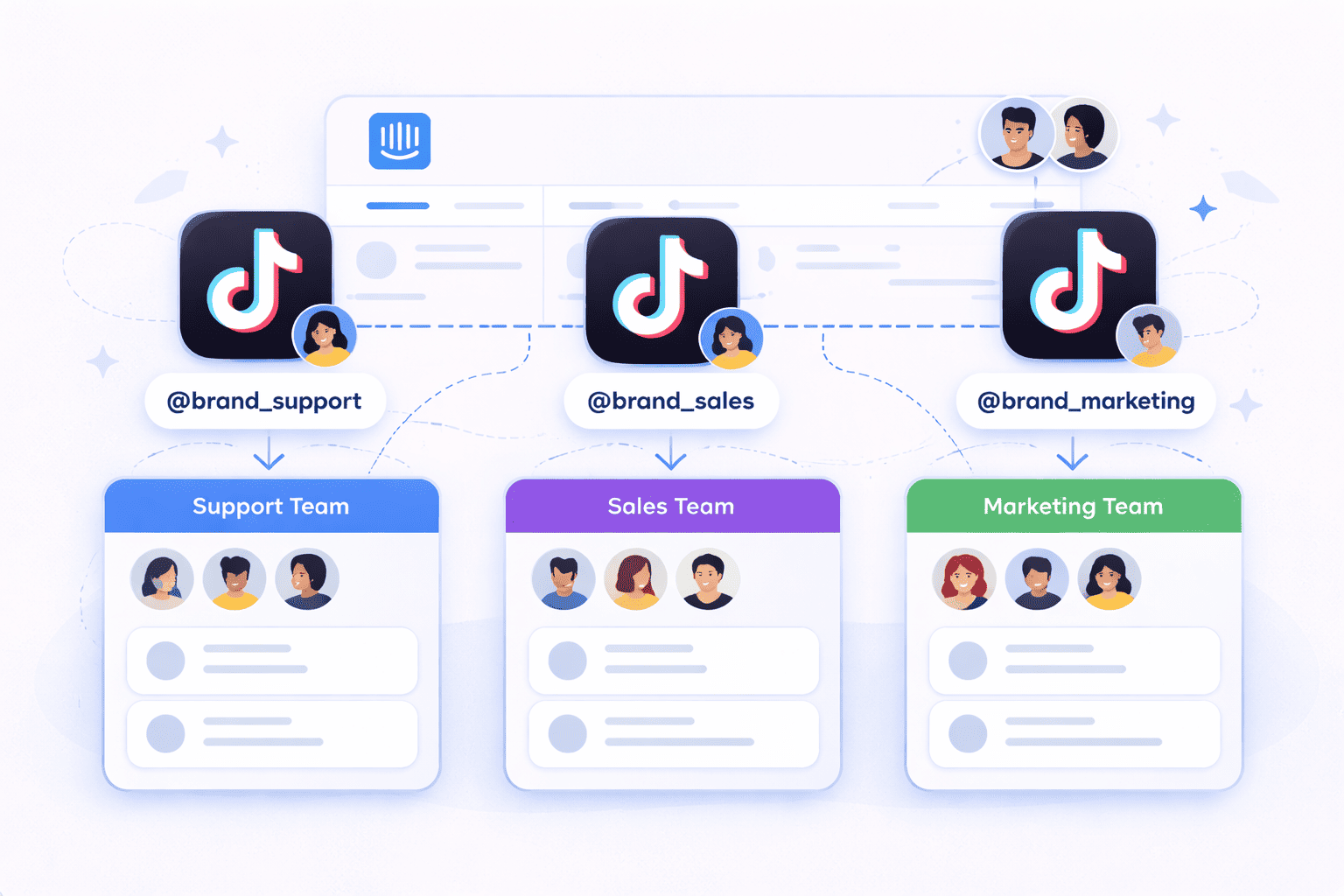
Here’s how you can do it.
Separate accounts by team
Different TikTok accounts often serve different audiences. Intercom lets you automatically assign conversations from each account to the team responsible for that page.
For example, your @brand_support TikTok account might route messages to the customer support team, while @brand_sales routes conversations to the sales team.
Create dedicated inbox views per account
Inbox views help agents focus on the conversations that matter to them. You can create Intercom TikTok inbox filters that show messages from a specific TikTok account.
For example, you might create an inbox view called “TikTok – Support Account.” This view only shows conversations that came from your support-focused TikTok page. Another view might display messages from your marketing TikTok account, where leads and product questions usually appear.
Maintain shared visibility across managers
Even when teams handle different accounts, managers still need full visibility across conversations.
Intercom keeps every TikTok conversation inside the same workspace, so managers can monitor activity across all accounts. They can review conversations, track response times, and identify trends without jumping between TikTok inboxes.
Routing rules for multi-account TikTok setup
When you connect multiple TikTok accounts to Intercom, you don’t need to build a separate routing system for each account. Intercom applies the same assignment rules to all incoming conversations, including TikTok messages.
You configure routing once inside Intercom, and the rules apply automatically across every connected TikTok account. If you want different accounts to route to different teams, you simply use conversation attributes or source data inside those rules.
Here are common ways teams structure routing for a multi-account TikTok setup:
- Route conversations based on the TikTok account source: Use Intercom assignment rules to detect which TikTok account the message came from. Route messages from @brand_support to the support team and messages from @brand_sales to the sales team.
- Apply different automation for different accounts: Each TikTok page often serves a different purpose. You can trigger different workflows depending on the account source. For example, the marketing account might trigger a lead qualification workflow, while the support account routes straight to an agent.
- Separate sales and support TikTok accounts: Many companies run one TikTok account focused on content and lead generation and another focused on customer help. Assignment rules can send sales inquiries to the sales team while directing support questions to the support queue.
- Create fallback queues for edge cases: Each channel connection includes a default teammate setting that acts as a fallback. If a conversation fails to assign through normal rules, Intercom sends it to the default teammate or queue so the message never goes unanswered.
Best practices for scaling TikTok accounts in Intercom
As your TikTok presence grows, your team may start managing several accounts at once.
Here are some practices to help you scale multiple TikTok accounts inside Intercom without creating confusion or overlap.
- Define ownership for each TikTok account: Assign clear responsibility for every account so conversations always have an owner. For example, the EMEA support team might manage @brand_emea, while the global support team handles @brand_support.
- Avoid giving every agent access to every account: Limit access based on role or team so agents focus only on the accounts they manage. This keeps inbox views cleaner and reduces noise.
- Standardize naming conventions: Use consistent naming for inbox views, tags, and routing rules so agents quickly understand which account they’re working with.
- Monitor conversation volume per account: Track conversation volume for each account so you can adjust staffing, routing, or automation as your audience grows.
FAQs
Can I connect multiple TikTok accounts to Intercom?
Yes, you can connect multiple TikTok Business accounts to one Intercom workspace using a messaging integration tool like Octopods. Each TikTok account connects as a separate channel, and TikTok DMs from every account sync into the Intercom inbox.
Will Intercom show which TikTok account a message came from?
Yes. When a TikTok DM appears in Intercom, the conversation keeps its source information. Agents can see which TikTok account the message came from, which helps teams manage multiple TikTok pages without confusing conversations between accounts.
Can different teams handle different TikTok accounts?
Yes, Intercom assignment rules allow you to route conversations from different TikTok accounts to different teams. For example, messages from a support-focused TikTok account can route to the support team, while messages from a marketing or sales account can route to the sales team.
Does each TikTok account need separate automation rules?
No, you configure automation and assignment rules once inside Intercom, and those rules apply to all incoming conversations. If you want different automation for different TikTok accounts, you can add conditions in the rules that check the TikTok account source and route conversations accordingly.